Read: 03 - HTML Lists, CSS Boxes, JS Control Flow
Today we will took a brief about some HTML Topics
HTML Topics
- Lists
- Boxes
also we will back to pre Read-02 To Cover Some Remaining items
JS Topics
- Basic JavaScript Instructions
- Decisions and Loops
Let’s Start
HTML
Lists
- Numbered lists
HTML allow Us To Creat an OrderList By It’s Tags <ol> With Using Items Tags insid List Tag <li>
For Example
<ol>
  <li>Coffee</li>
  <li>Tea</li>
  <li>Milk</li>
</ol>
The Out Put Will be :
1.Coffee
2.Tea
3.Milk
- Unordered lists

HTML Also Provide us with Unorder List <ul> With Using Items Tags insid List Tag <li>
For Example
<ul>
  <li>Coffee</li>
  <li>Tea</li>
  <li>Milk</li>
</ul>
The Out Put Will be :
Coffee
Tea
Milk
- Definition lists
Its used with Terms and thier Definition or Terms and Name , The Tag that Define Definition List is <dl>
Insid the <dl> we will put the terms and thier descrption , for this we use the tag <dt> for terms and <dd> for terms descrptions
For Example
<p>These three elements are used to create a description list:</p>

<dl>
  <dt>Coffee</dt>
  <dd>Black hot drink</dd>
  <dt>Milk</dt>
  <dd>White cold drink</dd>
</dl>
The Out Put Will be :
These three elements are used to create a description list:

Coffee
Black hot drink
Milk
White cold drink
For More Example : w3schools
Boxes
Every HTML element has own space and its like a box that content this element due of that we can apply a style using css on that box like changing width or add bolder …ect
- using
widthandhieghtTags we can determine the box dimension
For Example
<p>These three elements are used to create a description list:</p>

<div>
    <p>
       Hello EverBody in Read-02
    </p>
</div>


div.box {
height: 500px;
width: 500px;
background-color: #8E24AA;}
p {
height: 75%;
width: 75%;
background-color:#8E24AA;}
- Overflowing Content
the job of that tags is tell broswer about extra content in specific box limition , ex: if i have a large content in small box
it will be overflow of not display in broswer,so we have some tags that control this extra content
we have a tag called hidden <hidden> and the scroll .
the first tags it hidden the extra content and the second one it adds a scrollbar to see all content
For Example You Can Go to This Site Overflowing-w3schools
JS
Basic JavaScript Instructions
- Arrays
An array is a data structure where we can store more than one value
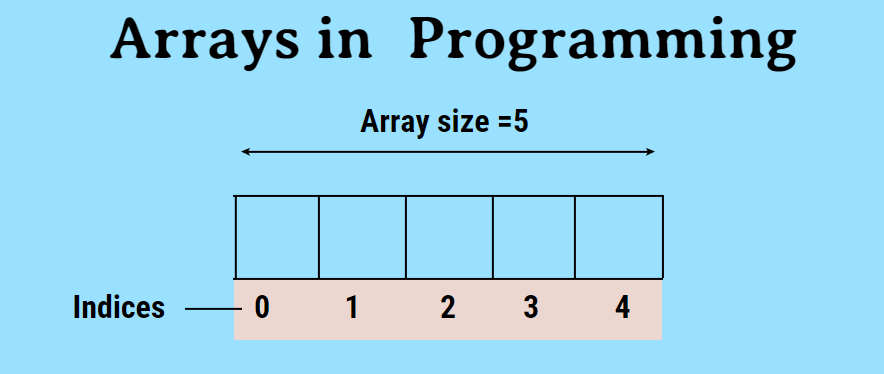
var Car;
Car ['BMW', 'Audi', ' Toyota'];
VALUES IN ARRAYS
Values In Array Access By Index
INDEX    VALUE
0       'BMW '
1       'Audi'
2       'Toyota'
Decisions and Loops
- If Statment
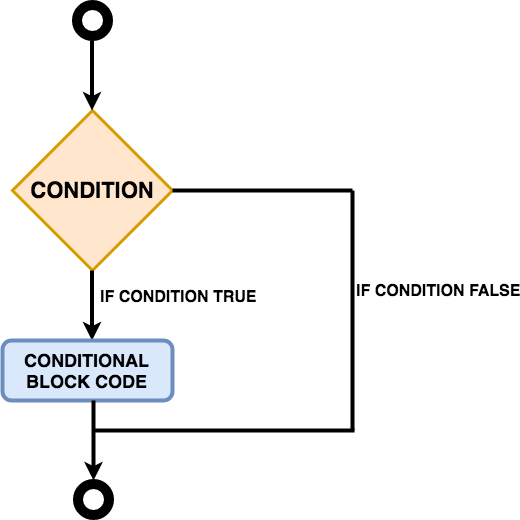
if statement is conditional statement that, if it true, then performs it run the block code. if , not its skip it. In Loops, it always checks the condition statement as an entry or stoping loops
For Example
if (hour < 18) {
  greeting = "Good day";
}
- Switch Loop
a switch statement is a type of condition control used to allow the value of a variable to change the control of program
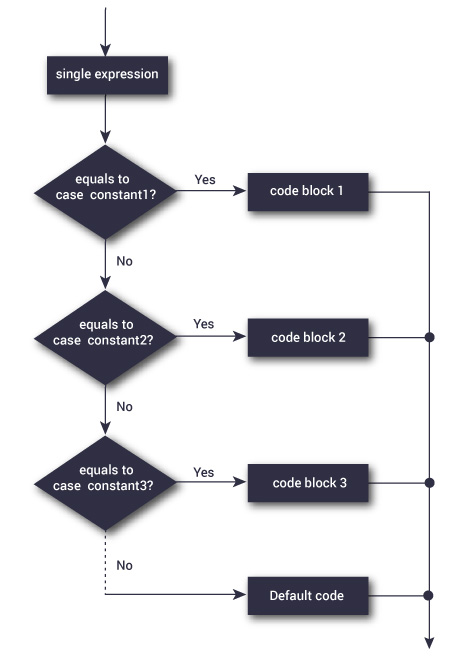
For Example
var day;
switch (new Date().getDay()) {
  case 0:
    day = "Sunday";
    break;
  case 1:
    day = "Monday";
    break;
  case 2:
    day = "Tuesday";
    break;
  case 3:
    day = "Wednesday";
    break;
  case 4:
    day = "Thursday";
    break;
  case 5:
    day = "Friday";
    break;
  case  6:
    day = "Saturday";
}
document.getElementById("demo").innerHTML = "Today is " + day;
</script>
- Loops
Loop it check the condition samilier to If Condition and if it true it will be run the code samilir to function
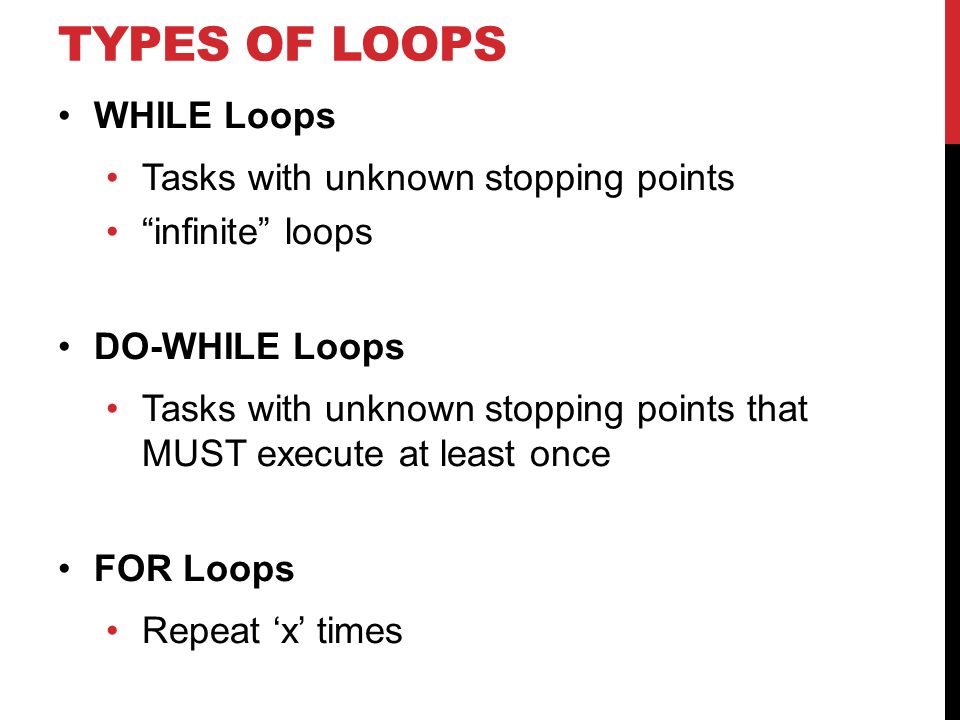
Loops Types
- For
- While
- Do While
and you can see the Differnce in the image
Loop Component
- For Keyword
- Condition
- Curly Bracket
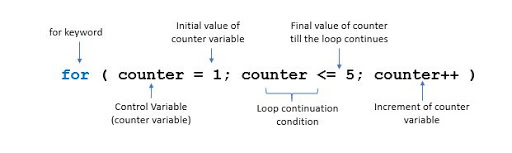
Loop Example
var text = "";
var i;
for (i = 0; i < 5; i++) {
  text += "The number is " + i + "<br>";
}
document.getElementById("demo").innerHTML = text;
Contact Info :
Please Feel Free To Contact Me When You Need help ^_^
- www.facebook.com/aghyadalbalkhi
- Email : aghyadalbalkhi@gmail.com