Read: 05 - HTML Images; CSS Color & Text
Here What We will Cover In Read-05
- Images
- Color
- Text
Let’s Start
Images

- Adding Images
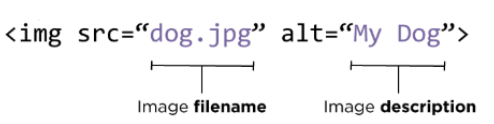
The <img> tag used to add images to html web page by using it’s tag with src attribute To set The resource of the image
For Example
<!DOCTYPE html>
<html>
<body>

<h2>HTML Image</h2>
<img src="img_girl.jpg" alt="Girl in a jacket" width="500" height="600">

</body>
</html>
- Image attribute
every tag in HTML has attribute and img also has like src alt width The attribute src stands for source and tells the name of the image, and the attribute alt describes the image and Width
For Example
<!DOCTYPE html>
<html>
<body>

<h2>HTML Image</h2>
<img src="404.jpg" alt="404 Error Photo" width="500" height="333">

</body>
</html>
- Where to Place Imagesin Your Code
we will see some cases of input the image insid <p>
- before paragraph
The paragraph starts on a newline after the image - after paragraph
The paragraph starts on a newline after the image - insid paragraph
The paragraph starts on a newline after the image
For Example
<img src="images/bird.gif" alt="Bird" width="100"
 height="100" />

<p>There are around 10,000 living species of birds
 that inhabit different ecosystems from the
 Arctic to the Antarctic. Many species undertake
 long distance annual migrations, and many more
 perform shorter irregular journeys.</p>

<hr />

<p> <img src="images/bird.gif" alt="Bird" width="100"
height="100" /> There are around 10,000 living
 species of birds that inhabit different
 ecosystems from the Arctic to the Antarctic. Many
 species undertake long distance annual
 migrations, and many more perform shorter
 irregular journeys. </p>

<hr />

<p> There are around 10,000 living species of birds
 that inhabit different ecosystems from the
 Arctic to the Antarctic. <img
src="images/bird.gif" alt="Bird" width="100"
height="100" /> Many species undertake long
 distance annual migrations, and many more perform
 shorter irregular journeys.

 </p>
- Aligning Images
These attributes to indicate how the other parts of a page should flow around image
- left
float :left - Right paragraph
float:Right
For Example
<!DOCTYPE html>
<html>
<head>
<style>
img {
  float: right;
}
</style>
</head>
<body>

<p>In this example, the image will float to the right in the paragraph, and the text in the paragraph will wrap around the image.</p>

<p><img src="pineapple.jpg" alt="Pineapple" style="width:170px;height:170px;margin-left:15px;">
Lorem ipsum dolor sit amet, consectetur adipiscing elit. Phasellus imperdiet, nulla et dictum interdum, nisi lorem egestas odio, vitae scelerisque enim ligula venenatis dolor.  velit.</p>

</body>
</html>
To Run into The Live Example Click Here w3schools
- Three Rules for Creating Images
- Check The Right Format Of Images
- Determie The Right Size Of Images
- Use a Good resolution
Color
- How to specify colors
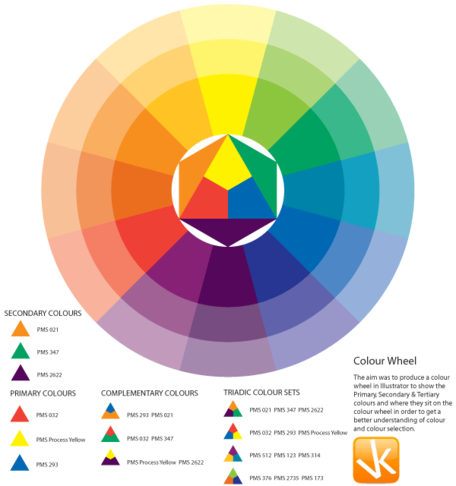
we can specify the color in Css In Three Way
- rgb values
h1 {color: DarkCyan;} - hex codes
h2 {color: #ee3e80;} - color name
p {color: rgb(100,100,90);;}
<!DOCTYPE html>
<html>
<body>

<h1 style="background-color:DodgerBlue;">Hello World</h1>

<p style="background-color:Tomato;">
Lorem ipsum dolor sit amet, consectetuer adipiscing elit, sed diam nonummy nibh euismod tincidunt ut laoreet dolore magna aliquam erat volutpat.
</p>

</body>
</html>
To Run into The Live Example Click Here w3schools
-
contrast
opacityIs Used To determine The opacity Of HTML ElementsrgbaIt’s Like RGB color values That set the Color but with opacity .
For Example
<!DOCTYPE html>
<html>
<head>
<style>
#p1 {background-color:rgb(255,0,0);opacity:0.6;}
#p2 {background-color:rgba(0,255,0,0.5);}

</style>
</head>
<body>

<h1>Rgba Colors With Opacity</h1>

<p id="p1">Red</p>
<p id="p2">Green</p>


</body>
</html>
To Run into The Live Example Click Here contrast
- Background color
HSLHSL stands for hue, saturation, and lightness.HSLAIt’s Like HSL but with opacity .
For Example
<!DOCTYPE html>
<html>
<head>
<style>
#p1 {background-color:hsla(120,100%,50%,0.3);}
</style>
</head>

<body>
<p>HSL colors with opacity:</p>
<p id="p1">Green</p>
</body>
</html>
To Run into The Live Example Click Here Background
Text

-
Size and typeface of text
-
Typeface Terminology
SerifSans-SerifMonospace
Specifying Typefaces font-family
h1, h2 {
 font-family: Arial, Verdana, sans-serif;
 }
Specifying The Size font
h1, h2 {
 font-family: Arial, Verdana, sans-serif;
 font-size: 12px;
 }
-
Type Scales
PixelsPercentagesEms24px200%1.5em - font-weight
h1 {font-weight: bold;} - font-style
h1 {font-weight: Article;} -
text-decoration
a {text-decoration: none;} - Spacing between lines, words, and letters
The Text Syle
-
text-align
leftrightcenterjustify -
text-shadow
p.one { text-shadow: 1px 1px 0px #000000;} -
Responding to Users
- hover
input.submit:hover {background-color: #665544;} - active
input.submit:active {background-color: chocolate;} - focus
input.text:focus {color: #665544;}
Contact Info :
Please Feel Free To Contact Me When You Need help ^_^
- www.facebook.com/aghyadalbalkhi
- Email : aghyadalbalkhi@gmail.com